Flash Dancer v.4.0 (updated December 11, 2019)
Flash Dancer lets you launch Adobe Flash files fullscreen on any monitor, or spanning fullscreen across multiple monitors. This fixes a huge problem with the Macromedia/Adobe Flash player, especially in kiosk and large scale multimedia applications. There's no limit to how many monitors Flash Dancer can use, its been confirmed to work on a 6 monitor setup without a burp.
It also allows your Flash programs to execute any local program on your computer. In other words, with Flash Dancer you're not restricted by the built-in FSCommands. And you can pass commandline arguments if you want.
Another nice feature is it hides that ugly popup dialog that appears when a user right-clicks the Flash window. So no more "About Macromedia Flash" popup dialog in your kiosks. As far as I know there's no other way to completely suppress this dialog short of Flash Dancer.
And you can see trace messages from your Flash movie in the main Flash Dancer window, which can be very useful for debugging.
Using Flash Dancer
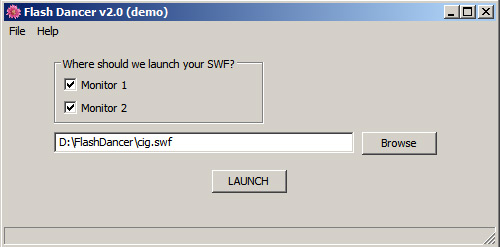
Usage of Flash Dancer is super straight forward, just download, run, and point Flash Dancer to your SWF. For example, in this screen capture, Flash Dancer is about to launch "cig.swf" fullscreen spanning monitors 1 and 2:
Creating Shortcuts
If you'd like, you can create a shortcut to your SWF that will launch your file with your saved options with a single click:

Commandline Usage
You can also run Flash Dancer from commandline if you'd like to use it in an automated environment. This will launch "logo.swf" on monitor 2:
c:\flashdancer\flashdancer.exe -fname="f:\my docs\logo.swf" -monitor=2
This will launch it on monitors 1 and 2:
c:\flashdancer\flashdancer.exe -fname="f:\my docs\logo.swf" -monitor=1,2
Note the quotes around the filename, which are only necessary if your path has spaces in it.
There's also the commandline switch "-hidden", which will keep the flash window from appearing in the Windows taskbar. This is handy if the computer is being used for other purposes and you don't want someone accidentally closing or minimizing the Flash window. Note that this only works when launching a SWF on a single monitor, not with monitor spanning. So for example:
c:\flashdancer\flashdancer.exe -fname="f:\my docs\logo.swf" -monitor=2 -hidden=yes
By default FlashDancer makes the background color of your SWF black. If you want to launch your SWF with a transparent background, use the "transparent" switch like this:
c:\flashdancer\flashdancer.exe -fname="f:\my docs\logo.swf" -monitor=2 -transparent=yes
Note that there's a second executable in the Flash Dancer directory called "FlashDancerCLI.exe", which is exactly like FlashDancer.exe except that it prints slightly more information to the console. So if you're running FlashDancer from commandline, you might consider using that version since it can help with debugging. All usage syntax is exactly the same as with FlashDancer.exe.
Running External Programs
Flash Dancer allows your Flash movies to run any program on your computer without any security restrictions. You can even pass commandline arguments to these programs, which Flash has traditionally prevented for mysterious security reasons.
For example if you want to run a program called c:\whatever.exe, you'd place this line of Actionscript in your Flash movie at the point you want it to run:
_root.flash_dancer = "c:\\whatever.exe";
Note that the backslashes are doubled: this is because Flash will otherwise translate that line as "c:\hatever.exe".
If you need to pass this whatever.exe program some commandline arguments, your line of Actionscript would look like this:
_root.flash_dancer = "c:\\whatever.exe argument1 argument2";
Remember that if you have spaces in your paths, you need to put quotes around them. So for example if I'm telling VLC to open some movie, my command would look something like:
_root.flash_dancer = '"C:\\Program Files\\VideoLAN\\VLC\\vlc.exe" "H:\\25 Cent Theater\\Adaptation (1of2).avi"';
Note that I'm using single quotes to surround the whole Flash variable, and double quotes to surround the filename and commandline parameters.
The only limitation to Flash Dancer's ability to run external programs is that the program must be an exe or bat file, and you must include the full path to the file.
And note that if you need to automatically restart Flash Dancer, you can put this line of Actionscript in your Flash program:
_root.flash_dancer = "restart";
If you want some message from your Flash movie to appear in the statusbar of Flash Dancer, put the following line of Actionscript in your Flash movie:
_root.flash_dancer = "trace: some message";
Let me know if you need any other communication between your SWF file and Flash Dancer, its very easy to add at this point.
Miscellaneous Notes
- one nice thing about Flash Dancer is its very non invasive to your computer. It doesn't install DLLs in your system folders, doesn't install any hooks in your video chain, doesn't even install anything outside its main program directory. In fact you don't need to use the installer at all to transfer it to another computer, just copy your c:\flashdancer folder.
- Flash Dancer suppresses the right-click menu over the Flash window. In other words, if a user right-clicks on your Flash window, they won't see the annoying "About Macromedia Flash" dialog. I can't see a reason to keep the ability to right-click, but let me know if you need this ability, its easy enough to add an option.
- I'm guessing this is obvious, but just in case: you close any window launched by Flash Dancer by clicking the Flash window and then pressing the ESC key.
- Vista and Win7 users may have to install the Flash plugin from within Internet Explorer to be sure flash.ocx installs system wide, but otherwise Flash Dancer should work just fine under Vista and Windows 7.
And if you have some kiosk or automation issue you need help with, email me, I'd be glad to help. I have 10+ years experience writing software for kiosks.
Frequently Asked Questions
Q: How can I hide the mouse cursor?
A: On the first frame of your Flash file, add this line of actionscript:
Mouse.hide();
Q: Flash Dancer is centering my movie, but I want it to appear on the left or right. How do I do this?
A: Add this line of Actionscript to y0ur movie:
this.stage.align=StageAlign.TOP_LEFT;
Let me know if it's still centering it.
Q: Does Flash Dancer work with Vista and Windows 7?
A: Yes. If you have a problem, install the Flash plugin from within Internet Explorer to be sure flash.ocx installs system wide.
Q: My system runs slowly and my SWF stutters when I display across multiple monitors.
A: Some transitions in Flash such as fades are very resource intensive, and when you make your Flash window very large, it can put a strain on your video card and CPU. This isn't a shortcoming of Flash Dancer, but Flash itself. Some things you can do to minimize this if its an issue for you: use less fades if possible, lower your screen resolution or (obviously) use a more powerful computer and/or video card. Another option is to convert your SWF to a Quicktime movie and then use Movie Spanner, since Quicktime, unlike Flash, does only minimal processing of your file and so can work with much larger display sizes. But don't let me scare you, most Flash movies display just fine even across many monitors.
Other Features
Let me know if you need need other features, or a custom build.
Issues
Its possible that this line of ActionScript in your FLA will crash FlashDancer:
stage.displayState = StageDisplayState.FULL_SCREEN;
The solution for now is to just comment out that line.
Updates
version 4.0 (12/11/19): A fix for Win10.
Download
Flash Dancer Installer. Note that in demo mode, the Flash window closes after a period.
Register